Launch & Promote Kit — All Your Social Media Content

Your Offer Is Ready. Now Get It Seen.

Generate a week of launch content — hooks, posts, video scripts, emails, and image prompts — one day at a time. Finished? Pick a new angle and generate another week. Unlimited weeks, unlimited products, one tool.

Try the example

Want to see what the tool actually creates?

Open the example tool and test it before you buy. Enter a sample offer, choose your platforms and tone, then generate a preview content pack so you can see the kind of posts, scripts, captions, image prompts, image cards, emails, and calendar ideas it creates.

  • Enter an offer name, short description, and audience.
  • Choose the platforms you actually use.
  • Generate real preview content for your offer.
  • See how the full kit turns one offer into reusable promo assets.
Open The Example Tool →

The example tool may show a limited preview. The full kit includes saved campaigns, four campaign types, unlimited fresh 7-day content weeks, platform variations, image card downloads, a content calendar, and Word document export.

Quick setup note: This tool uses your own Claude/Anthropic API key. Simple setup instructions are included, and you can start small with a small amount of API credit while you test it.
Get Launch & Promote Kit Today

Use the button below to get instant access. The full kit includes saved campaigns, four campaign types, unlimited fresh 7-day content weeks, platform variations, image card downloads, a content calendar, and Word document export.

Add to cart
See the process

See exactly how the campaign manager works.

Launch and Promote Kit offer details setup screen
Step 1

Create or open a saved campaign

Start a campaign for any product, service, physical item, coaching programme, course, membership, event, template, or offer. Each campaign saves independently so you can come back and continue later.

Launch and Promote Kit day selection and generate content screen
Step 2

Choose the campaign type and day

Choose Launch, Evergreen, Sale or Promo, or New Audience. Then pick the day you want, click generate, and get that day’s complete promo pack.

Launch and Promote Kit generated content pack screen
Step 3

Generate fresh content week after week

Every day gives you fresh hooks, platform posts, a promo email, short video script, and image prompts. When a week is finished, hit Next Week, choose a new angle, and generate another fresh 7-day campaign.

New campaign manager

Save multiple campaigns and promote more than one offer at a time.

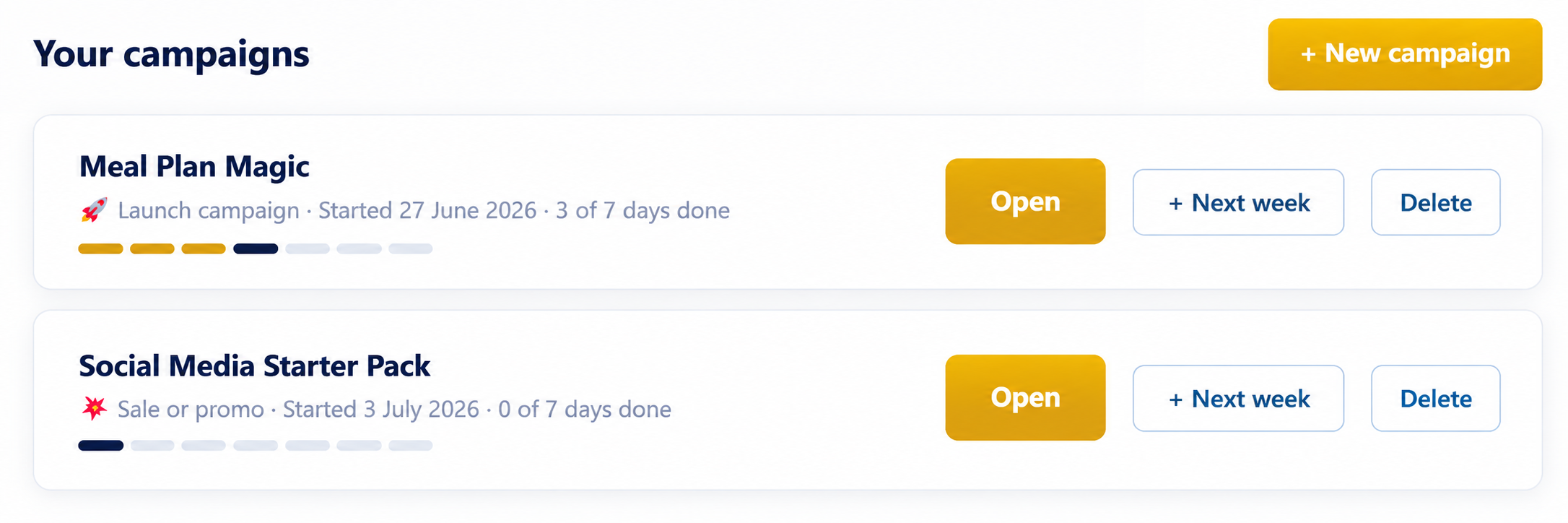
Launch & Promote Kit now opens as a full campaign manager. Create one campaign for a course, another for a coaching programme, another for a physical product, another for an event, and switch between them whenever you need. Each campaign saves independently, including generated content and ad copy, so you can come back any time and pick up exactly where you left off.

Launch and Promote Kit campaign manager screenshot
Campaign Manager preview — save different offers, switch between them, and start a fresh week whenever you need new content.
Multiple saved campaignsKeep separate campaigns for different products, services, memberships, events, or offers.
Next Week buttonStart a brand new 7-day content week for an existing campaign without rebuilding it from scratch.
Back to CampaignsMove between the campaign list and the day-by-day content view without losing your work.
Four campaign types

Choose the right kind of content week for what you are promoting now.

Instead of one fixed launch plan, you can now generate a fresh 7-day campaign around four different promotional goals.

🚀

Launch Campaign

The classic 7-day launch push: announcement, problem, behind the scenes, social proof, objections, urgency, and last call. Use it when releasing or relaunching anything.

🌿

Evergreen Content

Warm ongoing content between launches: tip, story, question, result, myth-bust, behind the scenes, and soft sell. Run it week after week indefinitely.

💥

Sale or Promo

7 days built around a limited-time offer, discount, or bonus: offer announcement, why now, value breakdown, who it is for, objections, countdown, and last chance.

🎯

New Audience

Hook-heavy, curiosity-driven content for people who have never heard of you before: stop the scroll, explain the problem, introduce yourself, show the solution, proof, and invite.

Never run out of content. Choose Evergreen mode and generate a fresh week of posts, scripts, emails, and image prompts every Monday. The AI never repeats itself.
One offer or manyKeep separate campaigns for every offer you want to promote.
Fresh weekly contentUse Next Week to create a new 7-day batch whenever you need it.
Seven platformsFacebook, Instagram, LinkedIn, X, TikTok, Pinterest, and Email.
Ad copy includedGenerate Facebook and Google ad copy, image prompts, and plain-English usage instructions.
New ad copy generator

Now Create The Ads That Get It In Front Of New People.

Once your organic launch content is ready, each saved campaign also has an Ad Copy button. Tap it and the tool generates paid ad copy for both Facebook and Google in one go — formatted for each platform, written to the right limits, and saved inside the campaign so it is there when you come back.

This turns Launch & Promote Kit into a more complete promotional system: organic content for the people who already follow you, plus paid ad copy to help reach new people.

Facebook ad copy Short mobile primary text, longer story-style primary text, headline, description, and a 4:5 vertical Facebook ad image prompt.
Google ad copy Three headlines under 30 characters, two descriptions under 90 characters, eight keyword ideas, and Phrase Match guidance.
Example 4:5 Facebook ad image created from the ad image prompt
Example Facebook ad image created from the kind of 4:5 prompt the Ad Copy Generator can produce.
The tool does not just create content. It tells you exactly what to do with every single piece of it. Every hook, post, script, email, ad, and image prompt comes with plain-English instructions so beginners never have to guess what to do next.
Generated content example

See what a generated campaign day can look like.

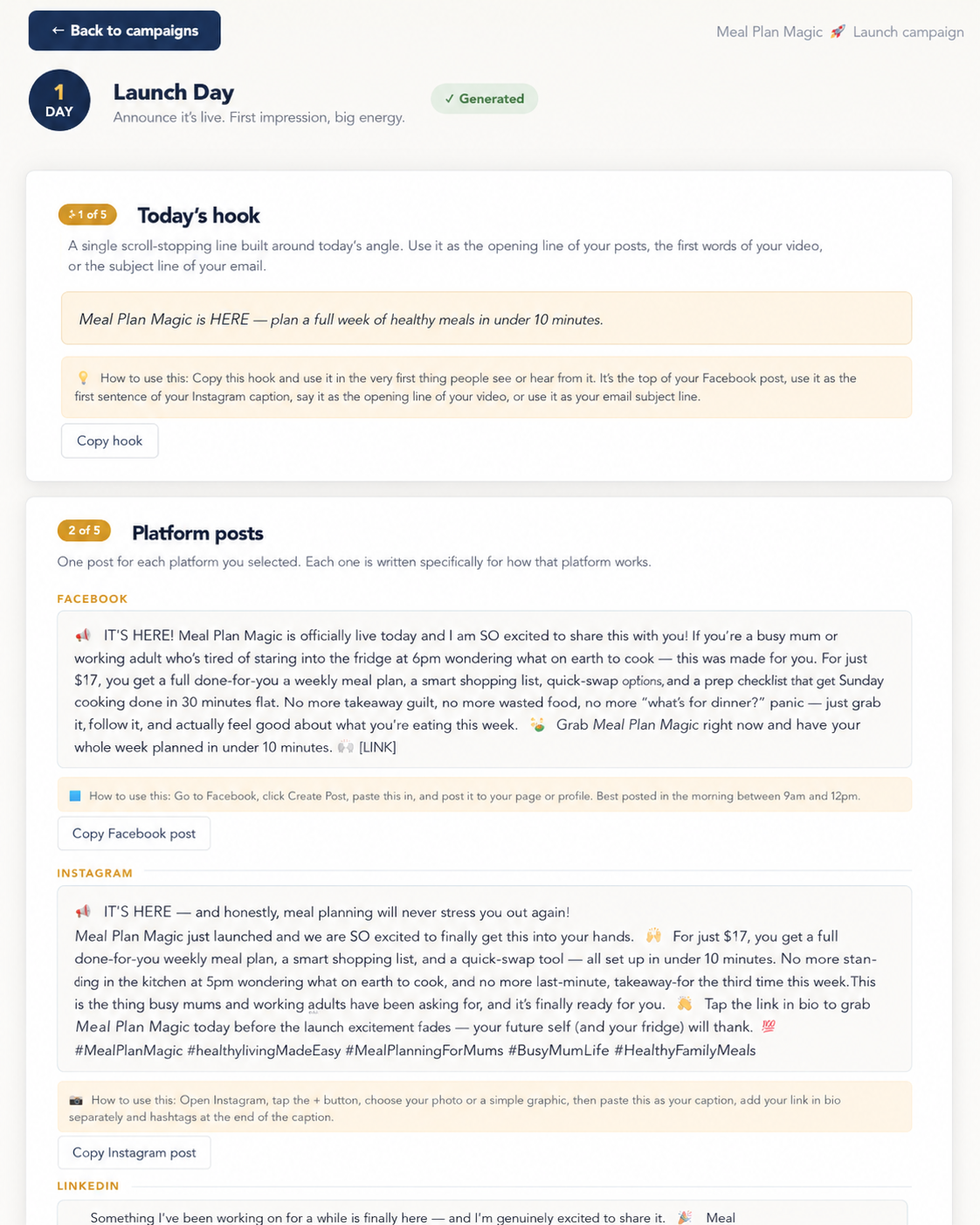
This gives visitors a clearer look at what the kit actually produces after they choose an offer, pick a campaign type, and generate content for the day.

It helps show that the tool is not just giving vague ideas — it creates usable posts, scripts, emails, image prompts, and instructions they can copy, paste, and act on.

Shows the actual style of generated output.
Supports the beginner-friendly promise with visible instructions.
Makes the sales page feel more real before the buyer clicks through.
Launch and Promote Kit generated content example
Example generated content view — a visual preview of the kind of output the campaign workflow can create.
Sample image prompts

These are examples of the image ideas the kit can help you create.

In the video above, the kit shows how an offer can be turned into launch content and image prompts. These sample graphics came from that style of workflow — one square social post and one tall Pinterest pin.

Facebook + Instagram sample
Square Facebook and Instagram sample image for Meal Plan Magic

Square promo post

A clean launch-style image for Facebook or Instagram that helps present an offer visually instead of relying on plain text alone.

Useful for launch posts, product announcements, social promos, bonus callouts, and offer graphics.
Pinterest sample
Tall Pinterest pin sample image for Meal Plan Magic

Tall Pinterest pin

A keyword-rich vertical pin designed for discovery traffic, content promotion, product promotion, and blog-style sharing.

Useful for Pinterest pins, blog promos, lead magnet promotion, and product discovery posts.
Works for more than one type of offer

Not just for one kind of creator.

Use it for physical products, handmade goods, services, coaching, courses, memberships, events, templates, lead magnets, digital products, affiliate offers, blog resources, and almost anything else that needs clear promotional content.

Product creators Service providers Coaches & course creators Membership owners Event promoters Handmade & physical product sellers Affiliate & niche marketers Small business owners
Stephen Henbie portrait
Stephen HenbieDigital product creator
About me

Built By Someone Who Actually Creates These Products

Hi, I’m Stephen Henbie. I create practical tools, prompts, sales pages, browser-based systems, and offer workflows for people who want to move faster without getting stuck in complicated tech.

I built Launch & Promote Kit — All Your Social Media Content because getting the offer ready is only half the job. The next problem is usually the same: what do I post, what do I email, what video do I make, and what images should I create?

This kit gives you a simple promotion workflow so you can turn almost any offer into fresh 7-day batches of content whenever you need them.

I build these myselfThe examples are based on real offers, tools, prompts, images, and sales pages I create.
Made for practical promotionHooks, posts, emails, scripts, and image prompts — not vague theory.
Built to move fasterSimple enough to use without needing a marketing team or complex launch plan.
What you get

Everything You Need To Turn Any Offer Into Fresh Platform-Ready Promo Content

Launch & Promote Kit — All Your Social Media Content gives you a simple browser-based workflow for creating promotional content without staring at a blank page, guessing your angle, or trying to write every post from scratch. Create a saved campaign, choose the campaign type, generate a week of content, then use Next Week to create another fresh batch whenever you need it.

  • Browser-based campaign manager
  • Save multiple campaigns for multiple offers
  • Four campaign types: Launch, Evergreen, Sale or Promo, and New Audience
  • Next Week button to start a fresh 7-day batch instantly
  • Back to Campaigns button so you can switch offers without losing work
  • Content for Facebook, Instagram, LinkedIn, X, TikTok, Pinterest, and Email
  • Facebook and Google ad copy generator
  • Ad image prompts sized for 4:5 vertical Facebook ads
  • Keyword-rich Pinterest pin titles and descriptions
  • Plain-English instructions for where every content piece goes
  • Hooks, platform posts, promo emails, and short video scripts
  • Downloadable PNG image cards
  • AI image prompts for your favourite image tool
  • Content calendar and one-click Word document download
  • Claude/Anthropic API setup instructions included
Get instant access
Launch & Promote Kit

The WarriorPlus button below will show the current checkout details and price, so the page stays consistent if the offer changes.

Add to cart No thanks, I do not want instant access today
secure checkout placeholder
Questions

FAQ

A few important details before you start promoting.

Will this work for my type of offer?
Yes. The kit builds the campaign around the details you enter — your offer, audience, problem, promise, inclusions, tone, and chosen platforms. It can suit physical products, handmade goods, services, coaching, courses, memberships, events, templates, lead magnets, digital products, affiliate offers, blog resources, and almost anything else that needs promotional content.
Do I need a Claude API key?
Yes. The tool uses your own Claude/Anthropic API key. Setup instructions are included, and you can start small with a small amount of API credit while you test it. Your actual usage cost depends on the model used and how many platforms you generate for.
Do I need to be technical?
No. If you can fill in a form, choose a campaign type, choose a day, and click a button, you can use it. There is no coding, no design setup, and no complicated launch software to learn.
How is this different from just using ChatGPT or Claude?
Instead of starting with a blank chat prompt every time, this gives you a structured campaign manager with saved campaigns, four campaign types, day-by-day generation, platform selection, image card downloads, a Next Week button, and a Word document export.
What does it create each day?
Each campaign day can create hooks, platform posts, a short video script, a promotional email, and image prompts based on the day’s angle, the campaign type, and your offer details.
Can I create more than one week of content?
Yes. When a 7-day campaign is finished, use the Next Week button to choose a campaign type and generate a brand new week of fresh content for that same offer. You can keep generating new weeks as long as you need content.
Can I save more than one campaign?
Yes. The campaign manager lets you save multiple campaigns independently, so you can promote several products, services, events, or offers and switch between them using Back to Campaigns.
Does it create paid ad copy too?
Yes. Each saved campaign includes an Ad Copy button that creates Facebook ad copy and Google ad copy in one go. It includes Facebook primary text, headline, description, a 4:5 ad image prompt, Google headlines, Google descriptions, keyword ideas, and plain-English instructions for how to use everything.
Does my generated content save when I come back later?
Yes. Generated day content, campaign details, and ad copy save inside the campaign, so when you come back later your previous work is still there waiting for you.
Can I clear everything and start fresh?
Yes. There is a discreet Clear All Data option at the bottom of the campaign manager. It asks for confirmation before deleting anything, so it is useful if you want to reset the tool or hand it to someone else.
Does it post to social media for me?
No. It creates the content. You copy and paste it into the platforms yourself, or schedule it using the social tool you already use.
Does it create finished videos?
No. It writes the scripts and gives you the on-screen text ideas, but you record yourself, your screen, or your offer demo using your phone, CapCut, or another video tool.
Does it create AI photos or stock images?
It creates downloadable browser-made image cards and AI image prompts. For full AI images, paste the prompts into ChatGPT image generation, Canva AI, Ideogram, Midjourney, Leonardo, or your preferred image tool.
© Launch & Promote Kit — All Your Social Media Content. All rights reserved.